

Dropshipping Kitchen Products: Validate Before Listing
Compare four kitchen-product candidates and four sourcing options using supplier, sample, cost, delivery, returns, and safety checks.
Dropshipping kitchen products means selling kitchen tools, appliances, or accessories that a supplier ships to your buyer.
You decide what the listing says and what the buyer should expect. Support and refunds stay with you. The supplier handles storage and delivery.
I've operated a print-on-demand Shopify store. I learned to make the customer promise specific before testing demand.
This guide gives you four named products and four supplier options. You'll write down the evidence needed to reject, test, or prepare to scale one of them.
Key takeaways
What makes kitchen products worth testing?
A kitchen product is worth testing when its evidence supports a clear offer. Save one dated demand source, the exact customer problem, supplier terms, delivery promise, and return route before you list it. A broad kitchen category cannot show that a particular item will arrive, work, and support the claim on its page.
Kitchen items can help people measure, store, cut, or cook. Test the exact item and supplier to learn whether they can meet that need.
Record these facts for one item and destination,
- The source URL, check date, product, and demand signal you observed.
- The customer job and product trait that make the offer useful.
- Current competing offers and how they describe the same job.
- The next fact that could disqualify the idea.
A marketplace rank, trend chart, or old sales screenshot can help you form a question. Use current costs, sample results, and tracked deliveries to check margin, quality, and delivery time.
Keep the date and source beside each note.
That tells you when to check it again.
Shortlist kitchen products
Compare the same four candidates with the Kitchen Products Validation Record.
Review these candidates,
- Digital kitchen scale.
- Insulated travel mug.
- Vegetable slicer.
- Air fryer.
For each product, you'll see the customer job, evidence to collect, and a likely blocker.
1. Digital kitchen scale
A digital kitchen scale is a sound first candidate when its readings stay consistent. It solves a clear problem in baking, cooking, and portioning. It also avoids the bulk of a large appliance.

Get the exact model's specifications. Review its capacity, units, increments, tare function, battery, size, and instructions. Weigh the same item several times. Compare the screen, buttons, tray, parts, and package with your planned listing.
One risk is a result that looks precise but keeps changing. Reject the model if repeated tests miss its stated limit. Do the same if the supplier changes the model without notice.
2. Insulated travel mug
An insulated travel mug is worth checking when its use case creates a clear offer.

A commuter may care about one-handed use. A desk user may care more about size and cleaning.
Confirm the mug's material, size, lid, seal, care steps, and heat limits. Test it upright and on its side. Repeat the test after opening and cleaning it several times. Check for sharp edges, odors, loose parts, and shipping damage.
Leaks and heat claims are the clear risks.
Artwork and logos add rights questions. Keep proof that you can use each design and photo.
3. Vegetable slicer
A vegetable slicer needs a strong safety and cleaning check before a listing test. Its use is easy to show. Its blades and moving parts make a weak design costly.
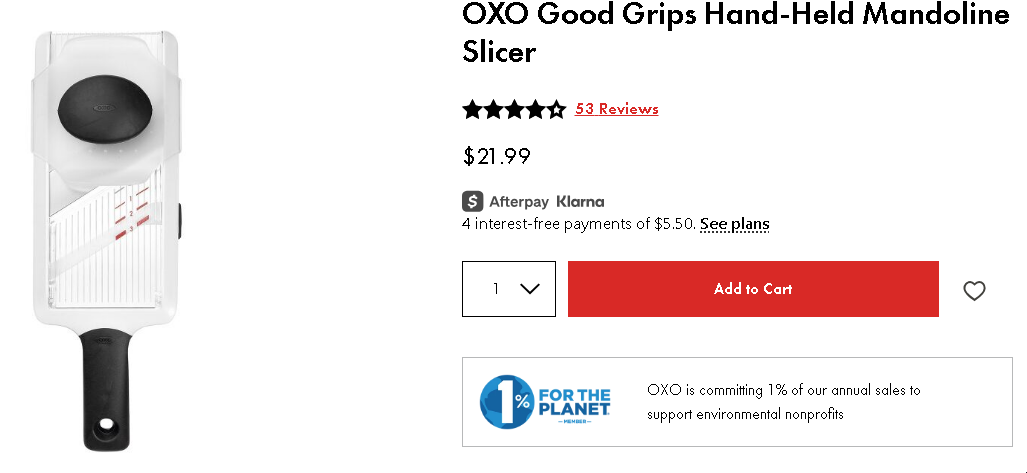
Check the sample for these points,
- Guards cover the blades during normal handling.
- Grips and locks stay in place during directed use.
- The cuts match the result shown in your planned listing.
- Every part can be cleaned and put back together.
Plan for missing blades and opened returns. Choose a return route that can handle a sharp item.
4. Air fryer
An air fryer is the hardest candidate here and may be a poor first test. It uses heat and electricity. The parcel is larger and the refund can cost more. More details can also differ from the listing.
/
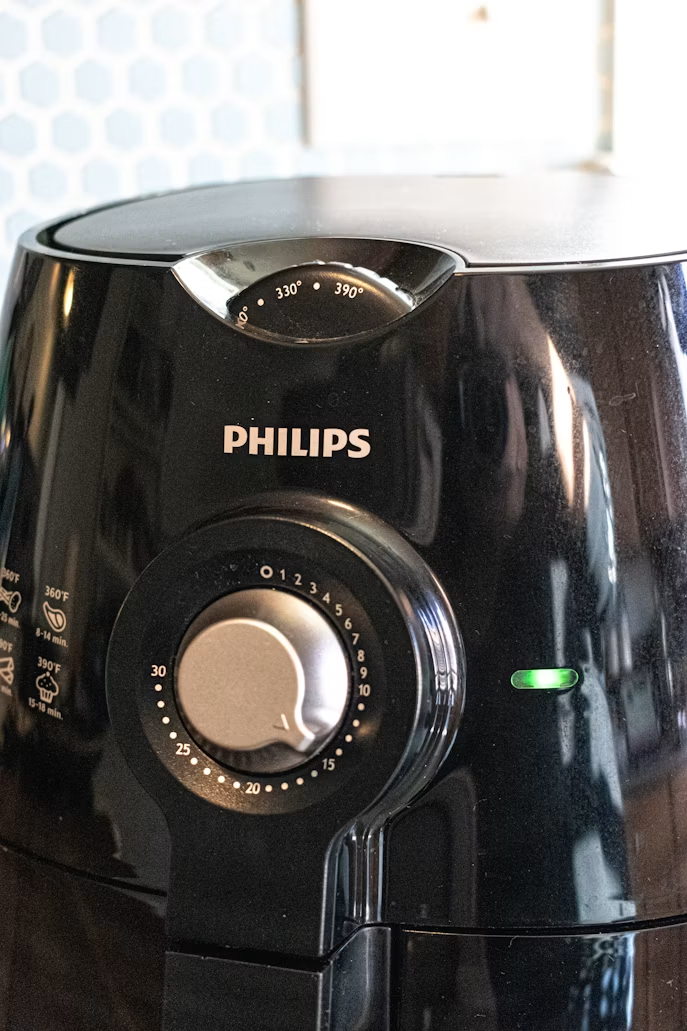
Run these checks on the exact model,
- Match its voltage, plug, wattage, size, heat range, parts, and labels.
- Review its instructions and product files for the same market.
- Use the sample only as directed and run one full cycle.
- Confirm the timer, controls, listed parts, and package condition.
- Record any strong odor, unusual noise, or damage.
- Get the warranty and return route in writing.
Use the CPSC and FDA sources in the risk section to find current product guidance. Stop if its cooking or energy claims lack support. You must also be able to fund a damaged return.
A smaller item may be a better first test.
Use the same evidence fields when you find winning products.
Take the two or three strongest candidates into the supplier check.
Check suppliers and fulfillment
Compare what each supplier can deliver for the exact product and destination.
The Kitchen Products Validation Record uses four linked checks,
Copy this record for each candidate,
- Product, SKU, destination, and sales channel.
- Demand source, check date, and observed signal.
- Supplier identity, product files, and sample result.
- Product, shipping, duty, fee, and refund costs.
- Tracked delivery range, return route, and fallback plan.
- Rights, safety, claim, and channel results.
- Decision, owner, and next review date.
Start with the supplier's identity and the exact SKU. Order the version your buyer will receive. Add each per-order cost.
Send a tracked order through the shipping route you plan to offer buyers. Write the return and swap plan before listing.
Run the product research workflow with a date and source beside each record.
These four options cover marketplace automation, print-on-demand, and supplier catalog sourcing,
- Dropified.
- Printify.
- Spocket.
- AliDropship.
Verify the exact SKU and destination before choosing among them.
1. Dropified
Dropified can automate stores that source from sites such as AliExpress or eBay. Its current dropshipping features cover product research, store import, and order tools.
First, identify the seller behind the exact product. Save the business details, model, warehouse, stock note, and sample result. Add the dispatch terms, tracking method, and return address. Ask what happens if the seller swaps the model or photos.
Automation can import a poor listing as quickly as a good one.
Product files, a sample test, and a tracked order to your market remain required.
2. Printify
Printify fits custom kitchen accessories better than generic appliances. Its kitchen accessories catalog lists aprons, tea towels, coasters, cutting boards, lunch bags, and mats. Different print providers fulfill them.
Choose the exact blank, print provider, print method, size, and market. Then order a sample. Test the print, material, color, package, care steps, and route. Check the provider's stock and shipping terms for each market.
Quality can vary by item and print provider. Test each item from each provider separately.
Custom art also adds image and design rights checks.
3. Spocket
Spocket is a supplier marketplace that can narrow products by source and destination. Its help center shows how to order a sample before adding an item to your store.
Record the supplier, ship-from point, processing time, carrier, item choice, stock, refund terms, and sample result. Then place a tracked order to your target market and measure the final delivery time.
Terms and quality can vary by supplier. Treat the marketplace listing as a lead and verify each claim you publish.
4. AliDropship
AliDropship fits a WordPress or WooCommerce store that sources from AliExpress. Its plugin features include product import, price rules, order tools, and tracking updates.
Confirm which plugin version fits your site. Then check the seller, item choice, model, images, warehouse, and route. Add the dispatch terms, return address, and swap process. Import only facts and images you checked and may use.
Choose the seller, claims, and return route yourself. Use the plugin to reduce manual import and order work.
Product Library shows TikTok Shop product sales and revenue. Sales Tracker follows selected shop sales and revenue. Shop Library helps you compare shops in the niche.
Use the research tools to choose what to inspect.
Then check shipping with the actual supplier.
Save the product URL, filter choices, check date, and reason it entered your shortlist.
Alt text: Dropship.io Product Library filter fields for price, sales, revenue, product images, and variants.
Screen Kitchen Products risks before listing
Stop a kitchen product when a rights, safety, claim, or channel check is still open.
Run these three screens,
- Rights: brand names, designs, images, and other rights.
- Product checks: safety, materials, claims, and labels.
- Channel checks: ad, marketplace, payment, and carrier rules.
The exact work depends on the item, market, buyer, claim, and sales channel.
1. Screen IP and branded-product exposure
Search each name, logo, design, package, photo, and claim you plan to use. The USPTO's trademark basics page links to its search tool. It also covers similar marks.
Ask the supplier who owns the product photos and packaging art. Keep any permission or license with the SKU. Remove a brand name or image when the supplier can't show that you may use it.
2. Screen safety, claims, and labeling exposure
Match the product's materials and use to current guidance for its market. Some items touch food. Food-contact substances can include cookware and food prep surfaces, as shown in the FDA's food-contact overview.
Use heated items, sharp tools, electrical goods, and children's items as separate search terms. The CPSC's online seller guide helps sellers find safety resources for goods they make, import, or sell.
Write down the exact use, model, material, heat, age group, and market. Add each warning, label, and test record. Use only files that match the exact SKU and intended use.
3. Screen advertising and marketplace limits
Put each listing or ad claim beside the proof that supports it. The FTC's advertising basics cover support for claims about results, health, origin, reviews, price, and urgency.
Open the current policy pages for each marketplace and ad network. Check each payment service and carrier separately. Save the URL, market, date, and result because their rules differ.
Use the CPSC business guidance to identify product-specific safety and certification checks before listing.
Decide before you launch
Choose one of three outcomes for each product.
Use these three steps,
- Reject.
- Limited test.
- Scale review.
An open rights, safety, claim, supplier, or channel check blocks listing. A limited test may answer a demand or ad-cost question after those checks pass.
1. List only when the evidence fields are complete
Approve a limited listing only when each required field has a dated source and result. Write "unresolved" when a check isn't done. An unresolved required field blocks the listing. Assign an owner and review date.
Tie the choice to one supplier, SKU, item, warehouse, market, and sales channel. Recheck the record whenever one of them changes.
Use the record to decide:
2. Test with a fixed budget and stop condition
Before buying traffic, set the maximum spend, review point, and event that will stop the test. Include the item, shipping, duties, fees, refunds, and replacement orders.
Use these events as possible stop conditions,
- A sample or delivered item fails its specification.
- The tracked order misses the promised range.
- A required document or claim can't be supported.
- The per-order cost rises above your limit.
- The return process costs more than the test allows.
Use our BEROAS calculator after you know the price and landed cost to set the test's ad-cost limit.
3. Recheck current terms before scaling
Review the supplier, item, route, claims, return terms, and channel rules before you raise spend. A later batch or a new warehouse can differ from the order that passed your first test.
Compare the fresh record with the approved version. Pause the increase when a checked fact changes, then resume only after the new evidence passes.
FAQ
How should I store supplier evidence?
Save one dated SKU folder for each product candidate. Keep the original supplier files, messages, sample notes, and the completed validation record in that folder.
What if the supplier substitutes the product?
A supplier substitution creates a new product decision.
Treat the substitute as a new product and repeat the review.
Can I test without a paid tool?
You can test without a paid tool by storing your research and test records in a spreadsheet. Paid tools can speed discovery.


