

How to Avoid Chargebacks on Stripe: The Setup Checklist
Stripe chargeback prevention starts with a recognizable descriptor, deliberate capture settings, targeted Radar rules, and dispute-rate monitoring.
Here's how to avoid chargebacks on Stripe. Configure four things before your first order ships. Set a statement descriptor customers recognize, and hold payments with auth-and-capture. Then block mismatched card and IP countries with a Radar rule, and run one Stripe account per store.
I deployed alert tooling on my own stores before I ever advised anyone on it, and Stripe taught me the lesson the expensive way. An alert on a charge nobody recognizes only ever ends in a refund.
Every setting below is easier to fix now than after your dispute rate starts climbing.
Key takeaways
How do you avoid chargebacks on Stripe?
Set a statement descriptor customers recognize, delay capture for up to 7 days, block card and IP country mismatches in Radar, and run one Stripe account per store. Each one targets a different point on the path from checkout to dispute:
- Descriptor: decides whether your customer recognizes the charge at all.
- Capture hold: gives you days to review before any money moves.
- Radar rule: automates that review on every payment.
- Account separation: keeps the dispute rate attached to the right business.
Customers file disputes through their bank for three broad reasons. The charge looked fraudulent, the product disappointed them, or the item never showed up.
Chargeback.io breaks down what each bank code asks you to prove in our guide to chargeback reason codes.
The stakes make this a pre-launch job. You lose the sale and pay a dispute fee on top of it.
The four settings run in order below, easiest first.
Step 1: Set a descriptor customers recognize
Your Stripe statement descriptor must be 5 to 22 characters long, contain at least 5 letters, and avoid four special characters. Stripe recommends your website domain or business name. For a dropshipping store, that's almost always the right call.
Here are the constraints in full:
- Length: between 5 and 22 characters.
- Letters: at least 5, so the descriptor has to include real words.
- Excluded characters: <, >, ', and ".
A descriptor your customer can't place is the most common way a legitimate charge turns into a dispute. Someone scans their statement and finds a name they can't match to a purchase.
Calling the bank is the fastest way to find out who charged them, so that's what they do.
I fixed this on my own stores before I fought a single dispute. Swapping a vague descriptor for the store's actual domain name did more for my chargeback rate than any dispute I ever won. The customer knew who charged them, so there was nothing to argue about.
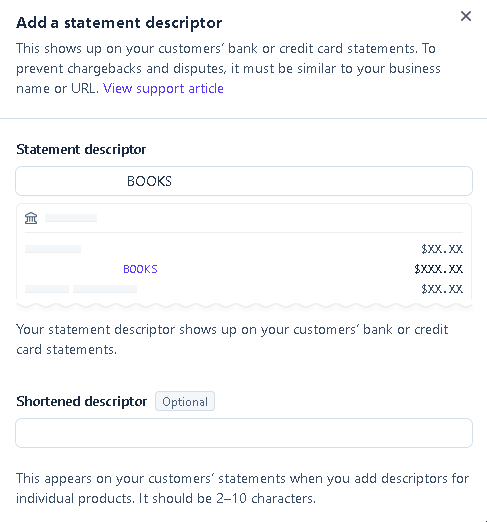
One catch sits outside this step. Run two brands through a single Stripe account and neither gets its own descriptor. Settle Step 4 first if you're running more than one brand.
Step 2: Hold payments with auth-and-capture
Stripe lets you authorize a charge and capture it any time up to 7 days later, and cardholders can't dispute an uncaptured authorization. Stripe captures immediately by default, so this is a deliberate change.
Authorization and capture do different jobs. Authorizing holds the amount on the card as a pending transaction, and the money stays in your customer's account. Capturing takes it, and from that point the customer can dispute the payment.
So while the charge sits uncaptured, you have days to look at it with nothing at risk. Skip the capture entirely and the authorization releases itself.
Use those days to check the order. Stripe's review checks are worth running:
- Addresses: does billing match shipping, and match the card's country?
- Identity: does the customer's email match the cardholder name?
- Repeats: have several orders on different cards come from one IP?
Expedited shipping deserves its own look. Fraudulent buyers pick overnight delivery freely, because someone else pays the card bill. Stripe suggests pricing it high enough that real customers rarely pick it, then screening whoever does.
Pair the hold with a shipping delay of 24 to 48 hours. Cardholders get time to spot fraud before your package is gone.
The hold is only worth as much as the review inside it. Manual review runs through Stripe's review queue, which needs a Radar plan that supports it. With nobody watching, the hold just postpones the outcome.
Step 3: Add a Radar rule that blocks mismatched card and IP
Write one Radar rule that blocks a payment when the IP country and the card country don't match. Radar is already built into Stripe, so this is a settings change you make in the dashboard.
Radar evaluates every payment against conditions you write, before the charge completes. Stripe suggests country rules for exactly this case, when fraud starts arriving from places you don't sell to.
A human reviewer would have to check the same two fields on every order by hand.
Three rules from Stripe's own documentation cover most new stores:
Swap the country codes for the ones your store actually sells to. The card-type rule is your copy-paste follow-up once the country rule has run long enough to read.
Set the rule action to Review first. A rule that blocks a whole country also blocks the customer travelling through it and the one on a VPN. On a new store you have no false-positive rate yet to tell them apart. After a few weeks, open Radar > Reviews. Switch the rule to Block once you can see the flagged payments were all fraud.
Step 4: Run one Stripe account per store
Each Stripe account should represent exactly one business, with its own statement descriptor and contact information. Stripe states this directly. It's also the setting most likely to be wrong on a store built by someone testing several niches at once.
Running two stores through one account merges both dispute histories into a single rate. If the brand you're testing takes a run of fraud, that fraud counts against the brand that's actually selling. Stripe reads one number for both, and the descriptor from Step 1 can only name one of them.
The contact information matters as much as the descriptor. Each account carries its own support details, and those are what a confused customer sees when they go looking for you. Point them at a brand they recognize and they email you. Point them at the wrong brand, or a generic one, and they call the bank instead.
Open a second Stripe account to test a second niche or brand. Stripe documents the path for additional accounts, and keeping the histories apart costs nothing during a low-volume test.
Splitting later is the expensive version of this decision. A dispute rate is account history, so it stays behind when you finally separate the brands.
Set the accounts up right and the store that stays clean keeps its own record.
Why dispute rate matters more in your first 100 payments
Under roughly 100 payments a month, one or two fraud disputes can push your dispute rate high enough to attract Stripe's attention. Stripe names this volume as a reason to refund suspicious payments more aggressively than an established store would.
Dispute rate is a ratio. The denominator is your payment volume, so with few payments, each dispute changes the percentage a lot.
The same dispute that barely registers at 5,000 payments a month is an account-level event at 40.
This stops being a problem as your volume grows. As payments build, refunding every ambiguous order starts costing more than the disputes would, and the aggressive posture belongs to low volume only.
Our CPA calculator shows what a single order nets you, so that refund-versus-dispute math uses your real margin instead of a guess.
Watch your own rate move in the Stripe Dashboard as volume builds.
Use alerts as your last line of defense
A chargeback alert system catches the disputes your settings miss, in the gap between a customer filing and it becoming a chargeback. That gap is the only point where you can still settle one cheaply.
An alert is only as useful as the descriptor behind it. When it fires on a charge your customer can't place, a refund is all you have left. There's nothing to remind them of. A recognizable charge gives the same alert a real chance to resolve, which is why Step 1 comes first.
Read incoming disputes as a batch, because Stripe's health alerts tell you when to run that check. When several share a shipping country, a card type, or a product, that shared trait is your next Radar rule.
Refunding the matching payments still sitting in your capture window costs you those sales and saves you the disputes.
Alert coverage varies by card network and processor, so treat it as the layer that catches what the four settings miss. Building that coverage processor by processor takes time most stores don't have.
That's what our chargeback tooling handles instead.
Related reading on chargeback.io
Chargeback.io covers the Stripe mechanics this build order leaves out. Read up on what a dispute costs, how to fight one, and what happens when an account is already in trouble:
- Stripe's per-dispute fee: what each dispute costs you.
- Stripe's official dispute policy: the policy behind the settings.
- Benchmarking your dispute rate: where your rate sits against other merchants.
- Recovering a suspended account: the worst case this build order avoids.
- Stripe apps worth adding: tooling beyond the native settings.
Start with the general prevention checklist for the settings that apply on any processor.
Supplier and shipping risk drives a different set of disputes, covered in our guide to chargebacks for dropshippers.
Selling through a second processor changes the playbook again, so read up on avoiding chargebacks on PayPal.
FAQ
Does refunding an order stop a Stripe chargeback?
A full refund does, because customers can't dispute a fully refunded payment. Card network rules let a partially refunded payment be disputed for the full original amount, so only a full refund closes it.
Does 3D Secure stop Stripe chargebacks completely?
No. Liability shift may protect 3D Secure payments from most fraudulent disputes. Early Fraud Warnings still reach you, and they still count against card brand monitoring programs.
Can I use one Stripe account for two stores?
You shouldn't, because Stripe asks that each account represent a single business. Sharing one blends both stores' dispute histories and forces them onto a single descriptor.
What if I ignore a Stripe fraud rate alert?
Stripe flags two attack types, spike for a single-day rise in your fraud rate and sustained_attack for a multi-day one. Ignore either and the disputes land anyway, when refunding the payments sharing that flagged trait would have stopped most of them.
Does delaying shipping actually reduce disputes?
It reduces your losses more than your dispute count. Stripe suggests holding shipment 24 to 48 hours so cardholders can spot fraud first, which means you keep the goods even when a dispute arrives.


