
How to Prevent Chargebacks: The Checklist Plus the Threshold
Chargeback prevention begins with recognizability, delivery and support basics, then uses network thresholds and alerts to protect the account.
Here's how to prevent chargebacks. Fix the causes a customer's bank sides with them on before a dispute happens, then catch what you missed with an alert system. The order matters, because an alert can only catch a dispute on a charge your customer already recognizes.
I worked a support role investigating merchants' processor setups. What stuck with me is how much chargeback pain traces back to a setup decision made on day one. The usual advice hands you a generic checklist and never says what it's protecting.
Key takeaways
What is a chargeback, and why do they happen?
A chargeback is a payment reversal your customer's bank forces through after they dispute the charge. Nobody asks you first. The money leaves your account before you get to explain anything.
They happen because of who the process was built for. Your customer's bank has one fast way to keep a cardholder happy. It takes the money back and sorts out details later.
So problems that should reach you as a support ticket reach the bank instead.
A statement line nobody recognizes. A delivery that slipped past the date you promised. A refund the customer couldn't figure out how to request. Each one has a slow path through you and a fast path through the bank.
Customers take the fast one. That's the whole problem in a sentence.
Refunds and chargebacks land very differently on your account. A customer who contacts you and gets refunded never touches the ratio your processor watches. The same customer going to their bank costs you the sale, a fee, and a mark on your account. Prevention is about getting the customer to call you instead of their bank.
Everything below happens before a dispute exists. Once one is filed you're in a different process. Winning a filed dispute runs on evidence and deadlines.
Fix the 5 causes that turn into chargebacks
Five fixes stop most of the disputes you'd otherwise get. Each removes a specific reason a bank currently sides with your customer. In order:
- Recognizable billing descriptor: make the charge match the name your customer bought from.
- Findable refund policy: put the terms where a frustrated customer will see them.
- Accurate transaction details: describe what was bought and when it ships.
- Reachable support: give the customer a faster answer than their bank offers.
- Complete transaction records: keep the evidence that proves the order was legitimate.
They work as a set, since each one targets a different trigger.
1. Use a billing descriptor customers recognize
Set your billing descriptor to the store name your customer bought from, not your legal entity. It's the cheapest fix here, and it removes the reason behind unauthorized-transaction disputes.
A descriptor is the text printed on a card statement next to the amount.
Picture one that reads as an unfamiliar LLC name or a generic processor string. A customer scanning their statement three weeks later can't connect it to anything they bought. So they call their bank about a charge they don't recognize.
The dispute that follows gets filed as unauthorized. The customer bought the thing and received it.
Set it in your processor's dashboard. In Stripe that's Settings > Business details > Public details. In Shopify Payments it's Settings > Payments > Manage. Add a support phone number to the descriptor field if your processor allows it. Then a confused customer has someone to call besides their bank.
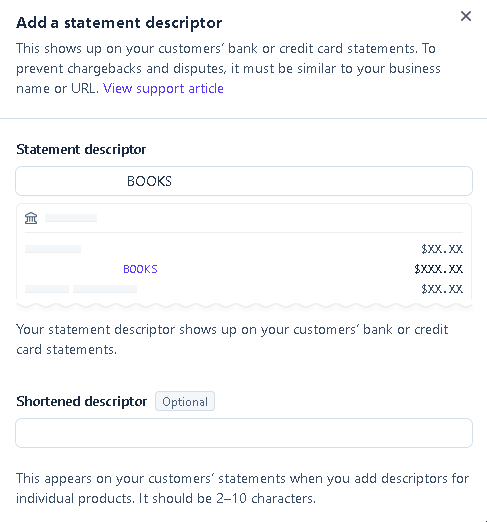
Stripe gives you more settings than this one field. They're covered in Stripe dispute settings.
PayPal sellers get an equivalent set of controls, covered in PayPal dispute settings.
2. Write a refund policy customers can find
A refund policy prevents disputes only when customers find it before they give up on you. That means linking it from checkout and the order email, not just the footer.
Placement is the problem, more than the wording. A customer who wants their money back won't look for long. If the refund path isn't visible inside that window, the bank becomes the obvious move.
Two stores can run identical terms and see completely different dispute rates.
Put the policy link in three places:
- Checkout page: next to the payment button, where the customer commits.
- Order confirmation email: the message every buyer opens.
- Shipping notification: the message they open while waiting.
Spell out three things. How many days from delivery the window runs, whether items must be unopened, and how long the money takes to land. Write that into the confirmation email itself, because nobody reading on a phone opens a second page.
3. Keep transaction details accurate and complete
Describe what you sold, confirm it in writing, and give a delivery date you can actually hit. A dispute is what happens when the product or the timeline doesn't match what your customer expected.
The mechanism is simple. Your customer's bank compares what they say they bought against what you can show they agreed to. Thin descriptions and vague shipping estimates leave that comparison to memory, and that's not a fight you win. The more you put in writing, the less your customer can dispute later.
Give a delivery date range rather than one date. Send tracking the moment the order ships. If the date slips, email before the original date passes rather than after. Tell a customer about a delay and they rarely file. Leave them watching a frozen tracking page and they do.
Overseas fulfillment makes that wait longer and the delay likelier, which we cover in the dropshipping cost breakdown.
4. Make support reachable before a dispute
Publish a support email that answers within one business day, and show it on every order email. Every customer who reaches you is one who called you instead of their bank.
Every dispute has a moment before it. Your customer is choosing between two paths. Reaching you is one, calling their bank is the other. The bank always answers, so being genuinely easier is the only way to win that comparison.
Put a support email and a response-time line in the order confirmation and the shipping email. Route it to an inbox someone reads daily. If you use a helpdesk, set an auto-reply saying when a human will respond. Silence after sending a message is what pushes people to their bank.
Refund the borderline case that reaches you before a dispute is filed. It's the cheaper of the two outcomes every time. Our CPA calculator shows what a single order nets you, so you can weigh that refund against the margin you'd actually lose to a dispute.
5. Keep records of every transaction
Keep order confirmations, delivery tracking, AVS results, and support messages for at least 120 days. That's the standard window your customer has to file, and undelivered-goods claims can run far longer.
Records work after a dispute is filed, which is exactly why they belong on a prevention list. What you can produce decides whether a filed dispute becomes a chargeback on your ratio. The merchants I saw lose winnable disputes were missing the delivery confirmation.
Three habits cover it:
- Export on a schedule: processors age order and dispute data out of the dashboard.
- Store delivery proof off-platform: keep it in cloud storage you control, so losing account access doesn't take the evidence with it.
- Log digital delivery: keep download and access records, since a digital seller can't reconstruct proof later.
The threshold that gets your account flagged
Visa flags a merchant as Excessive at a 1.5% dispute-and-fraud ratio, down from 2.2% on April 1, 2026, per Visa's current program rules. Mastercard triggers its own program at 100 chargebacks or a 1.5% ratio in a month, whichever comes first.
This is what the checklist is protecting.
Crossing either line means more than a fine. Your acquirer can:
- Demand a written remediation plan before it keeps processing for you.
- Add fees on top of what each chargeback already costs.
- Move you to high-risk processing with a reserve holding back part of your revenue.
Visa's ratio combines disputes and fraud, while Mastercard's counts chargebacks against your transaction count. Either way a smaller store trips the percentage on a handful of cases.
At 300 orders a month, five chargebacks puts you over Mastercard's line. Large merchants have enough orders that the same five barely move the number.
For the calculation itself, see how chargeback rate is calculated.
Watch the dates on older advice. Visa retired VDMP and VFMP on June 1, 2025, and replaced both with VAMP. Any guide still citing a 0.9% VDMP threshold describes a program that no longer exists. There's a fuller walkthrough of how monitoring programs work.
The second layer: alert-based prevention
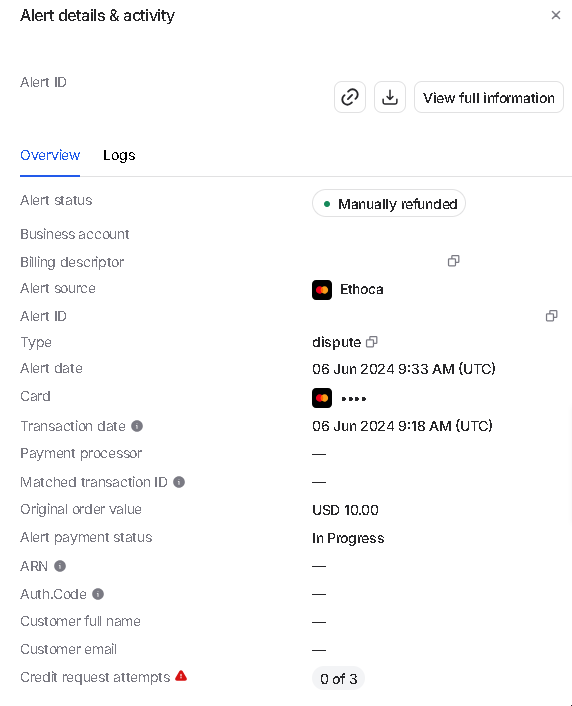
Alert networks flag a transaction as disputed before it becomes a formal chargeback. That gives you a short window to refund it directly and keep it off your ratio. Alerts catch the disputes that get filed anyway.
For the mechanism itself, see what a chargeback alert is.
Two companies run this. Ethoca is Mastercard's. Verifi is Visa's, and it has two products under it. RDR resolves a dispute automatically against rules you set. CDRN sends the alert and leaves the call to you.
People often describe these as four competing networks. There are two, and Verifi owns both of its products. Start with how Ethoca alerts work for the Mastercard side.
An alert only fires on a charge the network can match to your order. A descriptor nobody recognizes defeats an alert the same way it caused the dispute. The match runs on the same data. That dependency is why the checklist comes first.
Across Chargeback.io's own platform, alerts prevent up to 91% of chargebacks when that match is there. So the figure describes performance on transactions the network can match. Every store's own result depends on that match rate.
You can see how Verifi's products differ before choosing.
Where alert coverage runs out
Tokenized wallet payments are harder to trace back to the order, so alerts reach a shrinking share of transactions. Apple Pay, Google Pay, and Stripe Link all sit outside easy matching.
That match rate, not the 91% figure, is what sets your real number. So the five fixes above still carry the weight, even for a store paying for alerts.
Before buying anything, read a full alert network comparison to see which one covers your card mix.
On the vendor side, we compare chargeback protection software priced for smaller stores.
Chargeback.io walks through alert-based prevention in full once your checklist is done.
FAQ
Is chargeback prevention worth it for a small store?
Yes, and more than for a large one, because the thresholds are percentages of your order count. The descriptor and refund-policy fixes cost nothing but an afternoon.
Can I stop a chargeback after the customer files it?
Not through prevention, since the dispute already exists and runs on your processor's evidence timeline. Refunding at that point usually doesn't remove the chargeback from your ratio.
Do alerts replace the basic checklist?
No, because the checklist removes the reason a customer disputes. Alerts only catch the cases a network can match to your order.
How to fight against chargebacks?
Fighting a filed dispute is called representment, and you submit evidence against the reason code the issuer assigned. It runs on deadlines and documentation, a different job from everything above.


