

How to Run Facebook Ads for Dropshipping: Tips for High Conversions
In this article, I will show you how to properly run Facebook ads to improve your conversion rate (or get more sales).
Facebook is one of the platforms I use to run dropshipping ads. I also used it in the past to run ads for a restaurant.
Today, we will discuss:
- Advertising benchmarks
- How to analyze ad metrics
- How to create a Facebook ad account and find your pixel
- The right way to create an ad that sells
In the end, I am confident that you will have a baseline standard on what your Facebook ad should contain, what kind of ad copy works, and how you can target the right audience to make a sale.
Let’s get started.
Learn How to Make Viral Facebook Ads For Dropshipping
Why Run Facebook Ads: Are Facebook Ads Worth It?
Yes, Facebook ads are worth it, provided you are targeting the correct niche on the platform. Statista says that the industry with the highest click-through rate (CTR) is apparel & footwear [1], as shown in the graph below.

Source: Statista
As you can see here, the technology niche is not worth the trouble, as it only has a CTR of 0.93%. As far as the conversion rate goes, there is no source for data on this (from Facebook) as all these clicks go to millions of websites. It is not possible to get that data.
However, WordStream has a benchmark for conversion rates that we can use [2]. Based on the chart from WordStream below, the highest conversion rate belongs to the physical fitness industry, with a conversion rate of 14.29%.

As you can see from this chart, the other niches that you must target, based on conversion rates, are the following:
- Fitness - 14.29%
- Education - 13.58%
- Employment & Job Training - 11.73%
- B2B - 10.63%
- Healthcare - 11.00%
- Real Estate - 10.68%
For context, let us say you advertised a product in the clothing niche and got 10,000 impressions, with a CTR of 2%, you will get 200 site visits.
From the 200 store visitors, let us say that your conversion rate is 4%. In this case, you can expect to make eight sales.
With these numbers at hand, we can say that Facebook advertising is worth it, provided that you bring down the cost of your cost-per-mille (CPM), or cost per thousand ad impressions.
Supposing you spent $3 per 1,000 impressions, your total ad cost is $30. Now, if you made eight sales with a profit of $10 each, you made $80, and $30 of that went to ads, so you still come out with a profit of $50.
Two Things to Do Before Running the Ad
There are two initial steps you need to complete before you can dropship with Facebook, presuming that you already have a Facebook page. You cannot advertise on Facebook for your dropshipping store unless you have a Facebook page.
Step 1: Create A Facebook Ads Account
To create an Ads Account, you have to go to the META BUSINESS SUITE. I strongly recommend that you do this on a PC as it is easier than doing it on a phone.
Here is how it looks:
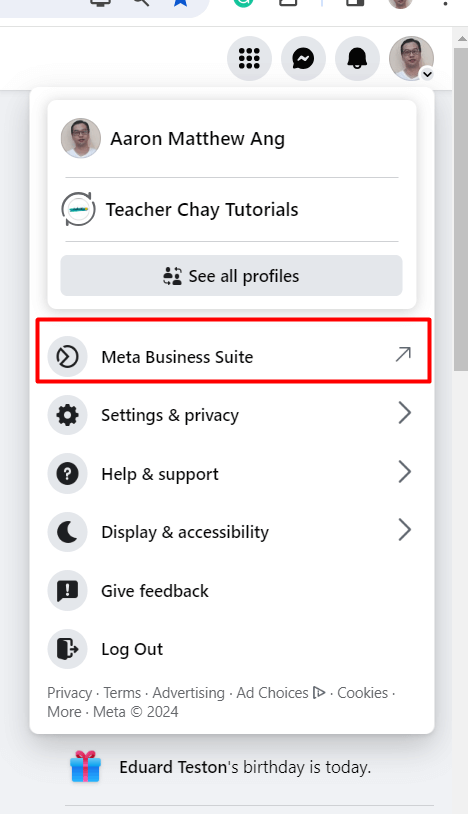
A new tab will open, which takes you to the Meta Business Suite. From here, you need to click on CREATE A BUSINESS ACCOUNT, like this:

You can see here that I already have a business account. If you do not have any business accounts set up yet, you will not see anything here but the LOGOUT and CREATE A BUSINESS ACCOUNT button.
Now, you will see this:

Fill it out, and then click on CREATE. Once you do, you will now have a META BUSINESS SUITE page like this:

From here, you can upload posts and manage your business. Right beside the CREATE POST button, you will see the CREATE AD button.
Once you click that, you will now be prompted to create an ad, add your credit card information for payment, etc.
VERY IMPORTANT: What we did here is create a BUSINESS MANAGER ACCOUNT, which some people call the META BUSINESS ACCOUNT. We DID NOT CREATE A PAGE. You mustn't confuse these two.
Step 2: Install The Facebook Pixel in Your Dropshipping Store
The next step is to connect your Facebook Pixel to your store. The Facebook pixel is a tracking ID that allows Facebook to measure what is happening in your dropshipping store about your Facebook ads.
First, you must create a Facebook Pixel. To do this, you must be on your Meta Business Suite page. Then, go to your BUSINESS SETTINGS.
NOTE: Do not go to page settings or settings. You must look for BUSINESS SETTING.
From here, you must click on DATA SOURCES, and then PIXELS. If you have no pixel yet, you can click on Create or Add, then follow the prompts.

Once you have a pixel, you need to integrate that into your dropshipping store. How do you do this? Follow these steps after you create a pixel:
Click on Data Sources > Datasets > the Pixel (in my case, Aaron Matthew Ang’s Pixel) > Open in Events Manager.

Then, you will see this:

Click on MANAGE INTEGRATION, and you will see this:

Select INSTALL PIXEL ON NEW WEBSITE, and you will see this:

From here, the installation process now varies from one dropshipping store to another. What matters is that you get the code. What I mean is that the installation process for Shopify is different for WooCommerce. I suggest that you go to YouTube to search for the process that applies to your store.
Steps to Run Facebook Ads for Dropshipping
In this section, we will not discuss what to click on Facebook to run a Facebook ad. This process is self-explanatory, even if you have no experience in running an ad on the platform. Facebook did a good job of walking a user through the advertising process.
Rather, we will talk about the things you must do to analyze, assess, and run a Facebook ad that will improve your success rate. Let us begin.
1. Analyze Your Target Customer
The first step to running a Facebook ad is to sit down and seriously think about your target buyer. You need to create a “persona” of the buyer, and only then can you start writing your ad copy and designing your ad images and videos.
It is easy to say, “My target audience is women because I sell high-heeled shoes.” That is a good start, but it is not enough.
Here are some things to consider:
- Demographics – list down exactly what age this buyer is and which country she lives in
- Finances – is this buyer a corporate lady or does she work at Walmart? How much income does she earn monthly or annually?
- Interest – is this buyer interested in Kim Kardashian? Does she like TV shows?
- Purchase Intent – why is this buyer going to buy a pair of high-heeled shoes? Is it for work or glamour?
As you can see, there is a difference between a target market and a target audience. The market is women, but the audience is something else.
Here is an example:
“The buyer is between 18 to 30 years old and living in New York. She works at a Business Process Outsourcing company and earns $40,000 yearly. She loves to watch shows like The Real Housewives of Beverly Hills and Keeping Up with the Kardashians. She wants to buy a pair of high-heeled shoes that she can use for her work.”
Once you have this definition, you can imagine the kind of person your target buyer is, and then you can begin writing an ad copy for her.
2. Create a Professional Image or Video
Do not just slap together some product images and create a carousel ad on Facebook. If anything, I can tell you that it will not work. The image or video you use must address the pain point of your target audience or buyer.
Speaking of literal pain, take a look at this:

This ad is a video, and somewhere in this video is a shot of the physical product—something that you use on your neck. What the advertiser did here was to first show the problem of the target audience—neck pain.
In the case of our high-heeled shoe, it makes sense to show a photo of an office woman wearing the shoe. Essentially, you have to show a lifestyle in the photo or video.
As a dropshipper, you may find this difficult to do. It is expensive to send your product to somebody and get a video of it while in use.
The alternative is to find a free image online that you can edit. It all boils down to creativity. You do not even need to show a photo of the shoe—the image of a corporate woman should be enough.
If your product is a toy, like a drone, ensure that you use images that show the drone while in use. Better yet, use a video that shows the drone being used for its intended purpose, like fun or aerial photography.
3. Create Various Headlines and Ad Descriptions
You need to write several versions of your headline and ad copy. Then, you must choose the best ones and run several versions of the ad.
Here are some tips on writing a headline and some examples:
- Make a promise – Improve your punching skills with these heavy bags!
- Offer a discount – Everything must go! 50% off on all items!
- Use numbers – 99% of Men Are Satisfied with Our Shaver!
- Solve a problem – Say Goodbye to Neck Pain!
- Ask a question – How would you like your neck pain to go away?
Now, creating various headlines and ad copies or descriptions can be tedious, but it is necessary. If you are having a hard time, you can always use AI to your advantage.
Here is an example from ChatGPT:

In addition, to writing the headlines, you can also ask ChatGPT to write the ad copy. Take a look at this:

It is now up to you two to tweak the ad copy and make it shorter. Long copies tend to be boring. Make sure that you make it as concise as possible. In addition, make it a point to use bullet points so your ad copy is easy to read.
Ask ChatGPT to produce several headlines and product descriptions, and then choose the best ones that apply to your target audience. You can even go further than what I did here. For example, you can tell the AI to create an ad copy specific to the “persona” you created in Step 1.
4. Learn to Analyze Your Ad Stats
Finally, learn how to analyze the results of your ads. You need to understand common terminologies in Facebook and make logical deductions from your ad performance.
Let us say that Facebook showed your ad to 23,000 people, and you paid $200. In this case, your CPM is $8.69. You are paying $8.69 for every 1,000 impressions of your ad.
If the frequency in your ad report is 2, it means that Facebook showed your ad, on average, twice to each person. In this case, the 23,000 impressions mean only 11,500 people saw it. Is this bad or good? It depends on your conversion.
If your CTR is 5%, it means that out of the 23,000 times the ad was shown, your ad was clicked 1,150 times (not necessarily by 1,150 people).
Then, finally, if your conversion rate is 10%, it means that out of the 1,150 clicks you got, 115 separate purchases were made (separate transactions).
You paid $200, and you made 115 sales. In this regard, your cost of acquisition is $1.73, which is not so bad. If your profit for each 115 sale is $19.99, you essentially made $18.25 gross profit per sale.
To understand if your CPM, CTR, and conversion rates are good, you can always research benchmark standards on Facebook ads.
Finally, if your performance is bad like your CTR is a measly 0.5%, it goes to show that your ad creative or your headline is not good enough. Change that, and then the new ad. It is also possible that you targeted the wrong audience.
Dropshipping With Facebook Ads (Video)
Tips for a Successful Facebook Ad
There is a lot to unpack here, so we will approach this issue with several pointers. Right off the bat, I must tell you that there is no secret sauce to advertising.
You must consistently advertise to find out who your audience is, what their challenges are, and so much more. Having said that, let us dive into some of the most important tips when advertising on Facebook.
1. Target a Big Audience
This advice is a bit contrarian to what many advertisers say. They claim that you have to narrow your audience according to your niche because you want to present your ad to the right people only.
It only makes sense, though, if your niche is deep, like goth clothing or bonsai tools. However, a better approach for broad niches is to target a big audience.
Why? It is because the bigger your target audience is, the lower your CPM is going to be. If you target a small niche, you must take into consideration that many businesses are bidding for the same people’s attention.
In this case, Facebook will charge you more money per thousand impressions. The highest bidder in this situation always wins. On the other hand, there are many people out there not being targeted by other companies—people who may have an interest in what you are selling. As such, it is alright for Facebook to show your ad to them at a fraction of the cost.
A higher impression rate can mean a higher potential for brand awareness, exposure, and a higher click-through rate. As a dropshipper, what you want is to build your brand and get clicks, which you are likely to achieve if you target a big audience.
As a general rule, make sure that your Audience Definition is GREEN, as shown below:

2. Target All Languages
It makes perfect sense to target all languages, even if you are advertising in the US only. Why? Because the United States has a diverse population.
Concerning this, I suggest that you do two versions of your ad. For the first one, target a worldwide audience. For the second one, target a specific country. Set the same budget for both, and then see which one performs better.
You can always stop the ad from running if the ad is not performing. For example, if you see that the ad for the US has a better impression rate and CTR, you may want to stop the worldwide ad and make some tweaks as necessary.
3. Use Two Placements Only
There are many options for ad placements, but the two best options are Facebook Feed and Instagram Feed. These two feeds have a higher engagement rate. Subsequently, ads shown on these feeds also have a higher conversion rate.

The Facebook feed is the very first thing that a Facebook user sees upon launching the app. Therefore, it just makes sense that you target this placement instead of placing your ad in Stories or Messenger.
4. Put a Lot of Effort on Copy

Ad copy may sound scary, but it is nothing more than “words that convince a person to take action”. This action can mean several things, such as:
- Download an eBook
- Register for an account
- Join a mailing list
- Visit your website
For Facebook ads, the kind of copy you want is a direct response. A direct response is a copy that entices a reader or viewer to take a specific action.
Your Facebook ad copy should have:
- Headline – this is the title of the ad
- Creative – this is the photo GIF or video in the ad
- Description – This is where you put the features and benefits of your product
- CTA – this is your call to action; it is a button that says, “Shop Now,” “Visit Our Website,” “Subscribe,” etc.
There is more to see in copywriting than meets the eye, and the best place to start learning is a blog post by Zapier, which discusses the anatomy of a successful Facebook ad.
5. Do A/B Testing
A/B testing means creating two versions of the same ad and running them simultaneously to see which one gets a better performance. It is expensive, but you must do it to learn how the market behaves concerning your product.
Since an ad has so many parts, the can be hundreds of permutations of the same ad. So, how does this work?
For example, you can have two ads, but the only difference is the target audience, or one ad targets males, and the other targets females only.
You can also create two ads with everything the same except the image. Or, you can use the same image but use different headlines.
A common error that dropshippers make when they advertise is believing that their ad copy is the “best” and that it must “convert.”
Quite the contrary, this is not always the case. You have to experiment in various ways until you get the right combination.
However, one thing you must stick to is the right call to action. If you advertise on Facebook as a dropshipper, you want ad viewers to SHOP NOW, and concentrate on taking that ad viewer to your store. Do not do anything else—you want sales and conversions, not memberships or anything else.
FAQ: How to Run Facebook Ads for Dropshipping
How much are Facebook ads for dropshipping?
There is no single answer to this, as the cost of your ads depends on your target country, niche, and many other factors like the number of advertisers or the period you selected, including the season of the year.
How do I get ads for my dropshipping business?
You can ask freelancers or marketing agencies to do the ad for you, create your Facebook page, and manage your social media ads. This approach, however, is expensive. You should use tools like Canva to create ads and do them on your own.
Does Facebook allow dropshipping?
Yes, Facebook allows dropshipping, but they do not allow advertising for dangerous, hateful, and immoral materials and products. Visit Facebook’s advertising restrictions for more information.
How do I run a Facebook ad on Shopify?
First, you need to integrate your Shopify store and Facebook page. Once done, you will see a MARKETING tab in your control panel. Click that, and you should be able to run ads.
Summary: How to Run Facebook Ads for Dropshipping
The actual steps, or the things you need to click on Facebook to upload and run an ad, are easy to do. What’s harder is to create an ad copy that will convert. In addition, you may also have some challenges analyzing your ad metrics.
One of the best things you can do is use our tool, Dropship.IO, to find winning ads on Facebook. The process is so easy—find a winning product in our product database and view the ads of that company on Facebook, all with a single button click!


