

How to Price Your Products: A Step-by-Step Guide
Calculate a product’s selling price from five cost lines, including customer acquisition and percentage fees, then test whether the price can support your advertising spend.
To price a dropshipping product, first add the dollar costs tied to one unit. Then divide by the share left after your target margin and percentage fees. The five-line build in this guide includes product, shipping, platform, payment, and acquisition costs. Add duties, packaging, return costs, and seller-paid taxes whenever they apply. The result is the selling price your inputs require.
I've priced products by multiplying the supplier cost by three. The number looked fine until the ad bill arrived, when I realized the supposed profit had paid to acquire the customer. Once I put that cost into the calculation, I had a price I could defend.
Key takeaways
How do you price a product?
A sound product price covers the costs you expect and leaves the share of revenue you chose to keep. First, total the dollar costs for each unit. Then subtract percentage-of-sale charges and your target margin from the full selling price. Divide the first number by what remains.
You can't turn a percentage platform fee into dollars until you know the selling price. The calculation has to solve for both at once. In the equation below, dollar costs sit on top and percentage charges sit underneath. This also exposes ad costs that a simple markup rule can hide, even when acquiring the customer costs more than the product.
Buyers still decide the most you can charge. If they won't pay the price your costs require, drop the product or cut a cost you control. A cheaper way to acquire customers may also close the gap. Another multiplier won't fix the problem.
How to calculate your product price
The Five-Line Price Build puts each cost in the order the calculation needs, then solves for one selling price. It's a cost-based method, while our guide to other pricing strategies explains when a different model fits.
Build the price in this order,
- Your landed product cost
- What the platform takes
- Payment processing
- What it costs to win the customer
- Apply your margin
The calculation separates dollar costs from percentage charges:
1. Your landed product cost
Start with what it takes to get one sellable unit to your customer.
Imagine your supplier charges $6 for the product and $2.50 to ship it to the customer. Together, those known costs come to $8.50.
Because the supplier handles fulfillment in this example, labor and packaging aren't seller costs. Platform and processing fees are. Add duty, seller-paid tax, a return allowance, or another per-unit cost here when it applies to your product.
2. What the platform takes
Add the fixed plan cost to the dollar total and subtract the per-sale percentage from 100%. Shopify lists Basic at $25 per month in its US pricing view. At an illustrative 100 completed units per month, that fixed cost adds $0.25 to each unit.
Basic also charges a 2% fee for a third-party payment provider. Because that fee applies to the selling price, keep it separate from the fixed costs. A low-volume store carries more fixed cost per unit, so replace the assumed unit count with your expected completed units sold.
Divide the plan bill across completed units because canceled and refunded units don't help pay it. When volume falls, each kept unit has to carry more of that fixed cost, which can make yesterday's price too low.
3. Payment processing
Subtract the processor's percentage from 100% and add its fixed transaction charge to the dollar total. Stripe publishes a standard domestic-card rate of 2.9% plus 30 cents per successful transaction.
The percentage grows with the price, but the 30-cent charge stays fixed. Shopify's public plan page doesn't give one card rate for every setup. If Stripe isn't your processor, use the rate shown by your provider or in your admin.
Match the rate to the cards and countries you actually accept. The domestic standard works for this example, but a cross-border order may cost more. Whatever the rate, subtract each percentage below the line and add each fixed charge above it.
4. What it costs to win the customer
Convert customer acquisition cost into a per-unit amount before adding it to the build.
Say paid social costs $12 to acquire a customer who buys one unit. That puts the full $12 into the ad-cost line for that unit.
If the average first order contains 1.5 units, the same acquisition cost falls to $8 per unit. Divide by completed first orders, and leave repeat orders out unless your acquisition figure also credits them. A first-order view is more conservative because it doesn't credit repeat purchases that haven't happened.
An account-wide average can hide a weak product too. Use acquisition cost for this product or its closest campaign instead of averaging a proven item with a new one. If you can't isolate that figure yet, divide the planned test budget by the orders needed to pass the test.
5. Apply your margin
Subtract the chosen margin and percentage fees from one, then divide the dollar costs by what remains. This example uses a target margin to show the arithmetic. Choose a target that covers operating costs and leaves enough return to justify the product risk.
Set a store-specific floor. Add monthly overhead not already in the five lines to the profit you want. Divide by expected monthly product revenue. That percentage is the minimum margin the price needs to leave.
For example, $400 of unallocated overhead plus $600 of desired profit against $5,000 in revenue calls for a 20% target. If buyers won't accept the resulting price, reject the product instead of quietly shrinking the margin.
The costs charged in dollars total $20.99. That figure includes $6 for the product, $2.50 for shipping, $0.19 for the platform, $0.30 for processing, and $12 for acquisition. The margin and percentage fees total 24.9%, made up of the 20% margin, 2% platform fee, and 2.9% processing.
Selling price = ($6 + $2.50 + $0.25 + $0.30 + $12) / (1 - 0.20 - 0.02 - 0.029) = $28.03
At $28.03, the platform takes about $0.56 and Stripe's percentage costs about $0.81. The fixed 30-cent Stripe charge is already in the dollar total. After rounding, you're left with about $5.61, the chosen 20% margin. The displayed price would be $28.09, checked against the same inputs.
Your ads have to earn the price back
The $28.09 price needs a break-even return on ad spend of about 1.59 before the campaign contributes profit. Before ads, the order leaves roughly $17.66 after product, shipping, platform, and payment costs. The order can spend at most $17.66 on acquisition before profit reaches zero, so break-even return is $28.09 / $17.66 = 1.59. At the assumed $12 acquisition cost, actual return is $28.09 / $12 = 2.34.
Triple Whale reports an overall TikTok return of 1.51 across more than 5,900 brands using its attribution platform, based on data from August 2025 through July 2026. That cohort is a reference point, but the example needs 1.59. Hold the ad budget until the campaign clears its own requirement.
An aggregate return can't predict what your product, creative, or audience will produce. Your ad line falls to zero on organic sales, while frequent returns add a cost that this five-line launch build leaves out.
Compare your campaign over the same attribution window used to calculate acquisition cost. Count only completed orders, and deduct refunds before calling the return viable. A campaign at 1.60 may clear the modeled line, but it fails if later refunds pull the kept-order return below 1.59.
How your platform changes the price
Each channel changes the percentage charges or dollar costs, so the same product can need a different selling price. Marketplaces take their percentage before your product and ad costs get paid. Your own store gives you more control, but building your store also leaves you responsible for demand.
Use the same comparison fields for each channel. Allocate plan or listing charges across expected completed units. Divide each fixed per-order charge by the completed units in that order, then add the result to the per-unit dollar total. Subtract percentage-of-sale charges from the full selling price:
Products that can absorb a category fee and benefit from existing demand may fit Amazon. Shopify makes more sense when you can create traffic and want more control. For Etsy or eBay, copy fixed charges into the dollar-cost side and percentage charges into the percentage side. Then rerun the same formula.
Before you use a marketplace rate in the formula, check the current fee schedule for each channel,
Fees vary by category, plan, and seller location.
When to redo the math
Recalculate when a cost increase materially reduces the unit profit your price was meant to leave. This editorial trigger ties the recheck to the money you could lose.
Run the recheck in this order,
- Record the new supplier and shipping cost per unit.
- Subtract the old landed product cost from the new one.
- Divide that increase by the expected profit per unit.
- Rebuild the price when the result reaches the trigger you set.
Suppose the supplier raises this product from $6 to $6.60. That extra 60 cents eats about 11% of the $5.60 profit expected at a 20% target, so the change crosses the trigger. Keeping the old price would also push the required ad return from about 1.59 to 1.65.
Rerun the complete price instead of adding 60 cents to the list price. Percentage fees also rise when the selling price rises, so a dollar-for-dollar change leaves less than the intended profit. A fixed-term supplier agreement can pause this check until its price expires.
Use a pricing calculator
A calculator lets you compare several prices without reworking the same checked costs by hand. The arithmetic gets tedious after the first run because one fee can change both sides of the equation.
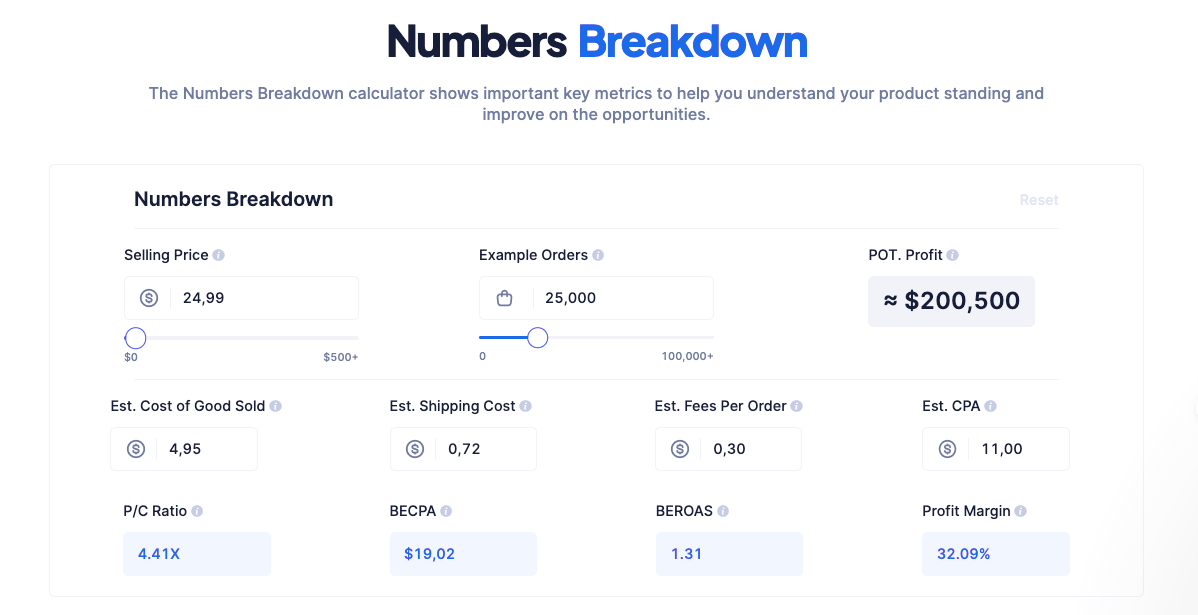
Enter the real selling price and product cost, then compare the calculated break-even return with what your campaigns produce. The tool can't know your acquisition cost or channel fee, so fill in those inputs before you trust the result. Precise math still gives you the wrong price when the costs are guesses.
Save the cost inputs beside the result and date the run. When a charge changes, replace that line and rerun the calculation. The saved record shows why the old price stopped working.
How to test a price change
Test one product price over a fixed window and judge the change by profit per visitor. A higher price can convert less and still earn more per visitor.
Set the test before changing the listing,
- Choose one product and keep its offer, creative, and audience fixed.
- Record visitors, completed orders, refunds, pre-ad contribution per order, and ad spend per visitor.
- Use the same weekday and traffic mix.
- Multiply conversion rate by pre-ad contribution, then subtract ad spend per visitor.
- Keep the price with higher net profit per visitor if service results hold.
Net profit per visitor = (completed-order conversion rate × pre-ad contribution per order) - ad spend per visitor
In this example, one price has lower ad spend, a modest conversion rate, and less pre-ad contribution per order. A higher price can convert less often but still produce more contribution per visitor when its per-order contribution is higher.
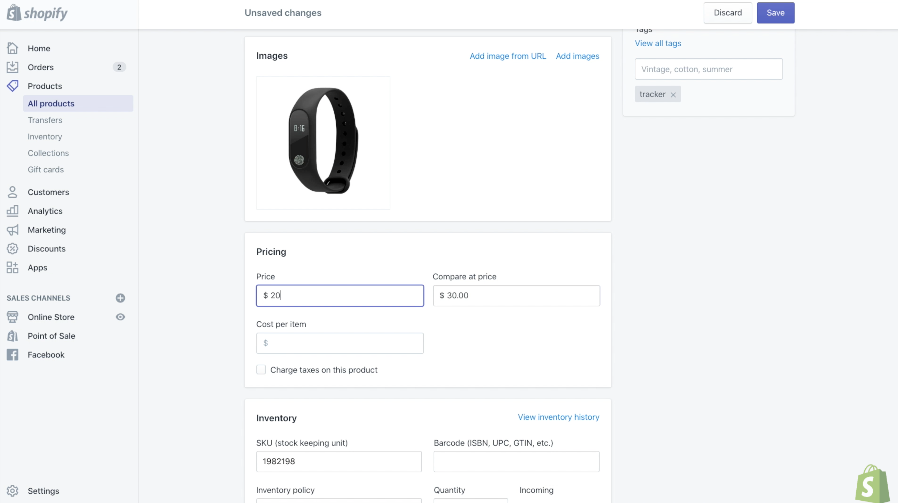
Low traffic can make random variation look real. Keep the new price only when profit per visitor improves without more refunds or support complaints.
Use a practical order floor per price and one full return window. That is not statistical proof, but one refund should not decide the result on its own. If one order still flips the result, call the test inconclusive and use the cost build.
FAQ
Should I use a 3x markup rule?
A simple markup rule works only when the resulting price covers every fee, acquisition cost, and chosen margin. Run the full cost build before using it as a shortcut.
What margin should I target?
Choose a margin that covers your operating costs and leaves a return worth the risk because no universal target has sound data behind it. Test that input against what buyers will pay and what your traffic costs.
Do I include returns in the price?
Include expected return costs when refunds, replacement shipping, or unsellable products materially reduce completed-order profit. Use your own completed returns because product category and policy change the rate.
Can I charge less than a competitor?
You can charge less when your verified cost build still clears the margin and ad-return requirements. A rival's price doesn't prove their costs, traffic source, or profit match yours.


