

How to Save Facebook Ads for Ecommerce Inspiration
Provides a practical workflow for saving, labeling, and analyzing Facebook ads so useful creative patterns become original product or campaign tests.
How to save Facebook ads depends on volume. Collect occasional ads with organized screenshots, or use a browser extension for repeated research. Meta lets you save searches, but your own collection keeps individual creative for later study.
I've run Shopify stores and consulted for e-commerce businesses. For this workflow, I keep the source and the reason beside each save so the record stays usable.
This guide shows you how to save Facebook ads, label the useful parts, and turn each good find into an original product or creative test.
Key takeaways
What are Facebook ads and why save them?
Facebook ads are paid placements that promote a product or service across Meta's apps. A saved ad is a research record that keeps the creative, advertiser, context, and reason you found it useful. A plain screenshot captures the image, while a swipe-file entry also records the hook, offer, proof, format, and landing page you want to inspect later. Our guide to Facebook ads for e-commerce explains the wider campaign structure.
The public Meta Ad Library lets you search current ads by advertiser or keyword. It saves search settings only. Use your own collection to keep selected creative with notes and tags.
That distinction matters once you research more than a couple of ads. A strong opening line may help with copy. A product demo may help with video direction. If both land in one loose download folder, you'll struggle to find either when you start the next brief.
Naming the useful element gives you a specific point to compare across ads. As the collection grows, you can see which hooks recur, which proof styles disappear, and which questions still lack a clear answer.
You can skip the whole process when you only need a quick look at one advertiser. Build a swipe file for repeated research, team handoffs, or regular returns to the same niche.
How to use the Facebook Ad Library
Use the Meta Ad Library to narrow a broad market into a small set of active ads that answer a research question. Start with the Meta Ad Library, choose the target country and All ads category, then search an advertiser name or a product phrase.
A brand search compares one advertiser's variants. A product search compares positioning across advertisers, as our guide to searching by competitor or keyword explains.
Use filters to cut irrelevant results. If the page looks empty, broaden one country or category filter at a time, then try a shorter advertiser name.
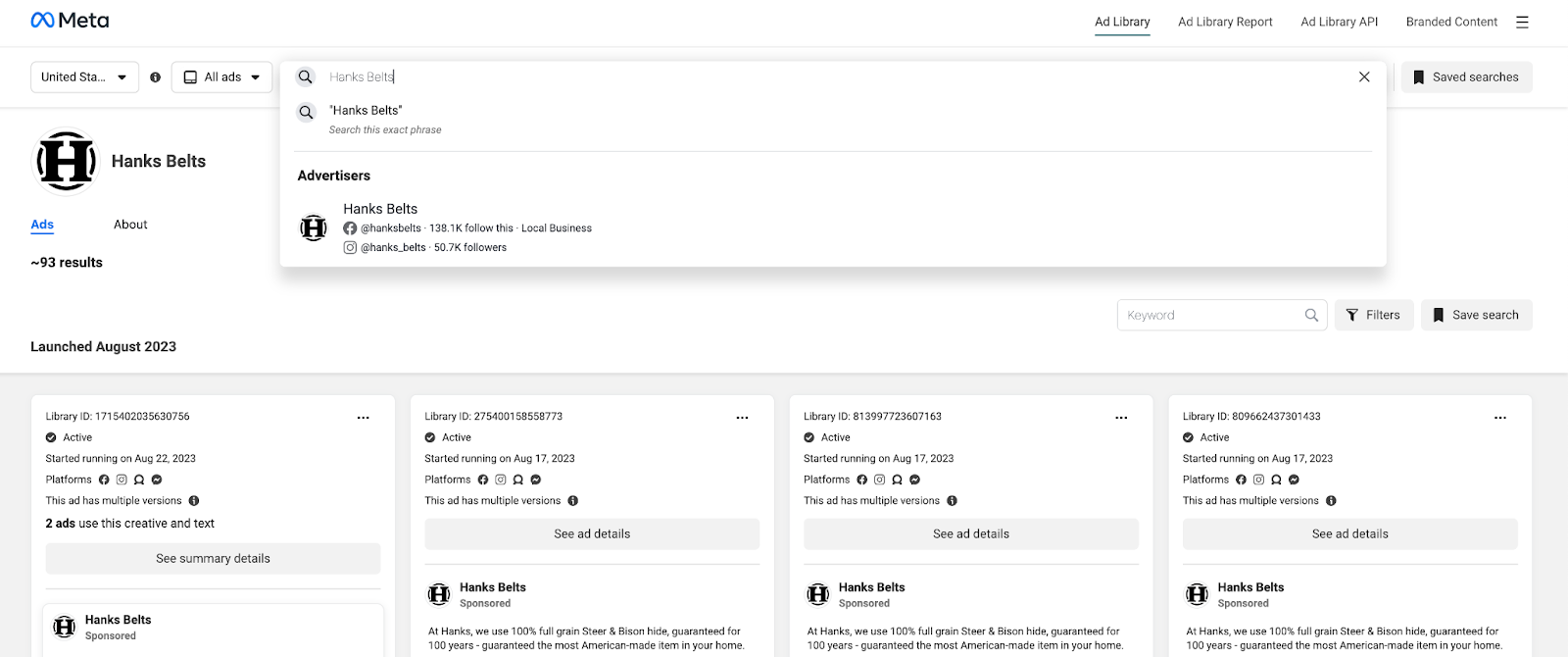
Open each candidate and scan its date, platforms, copy, creative, and variants. Save ads with an element you can examine.
The interface shows public creative and activity. It doesn't show sales or profit. Treat every result as a candidate for analysis rather than proof that the campaign worked.
Write the research question before opening a dozen ads. "How do luggage brands prove durability in the first five seconds?" gives you a useful selection rule. "Find good luggage ads" invites a folder full of unrelated creative.
Keep the Ad Library URL and capture date with every save. Ads can stop or change. The link and date identify the version behind your note.
What makes an ad worth saving?
Save an ad when you can name one reusable element, preserve its context, and turn the observation into a test. I keep a main swipe file for clear patterns and a small inspect-again queue for ads that have one promising element but an unresolved weakness.
Use this triage before adding another file:
- Pass: Name the reusable element and the test it suggests.
- Fail: Skip any screenshot with no written reason for saving it.
- Uncertain: Isolate the strong element and record what still needs checking.
A pass might pair an opening product demonstration with a brief to show the same benefit using your own footage. Record the demonstration structure, audience, and proposed test in one or two plain sentences.
A failed save often looks impressive but teaches nothing specific. Labels such as "great ad" or "nice creative" leave the next person to repeat the analysis from scratch. If you can't replace that label with an observable choice, the image doesn't belong in the main collection.
An uncertain ad belongs in a separate queue when the hook is strong but the offer stays vague. Comments may also show interest alongside repeated confusion. Preserve that tension because moving the ad into the pass folder would hide its weakest part.
Review an uncertain save when another ad uses the same element. Move it to Pass only when you can state a specific test. Delete it when another comparison still leaves the lesson unclear.
Ways to save Facebook ads
Save Facebook ads with an organized screenshot workflow or the Dropship Chrome extension. Both methods start free. Screenshots offer portable files and full control without an install. The extension reduces capture steps and keeps collected ads in one view, although its public listing doesn't document data export or retention.
Create a manual swipe file
A manual swipe file works best when you save ads occasionally and want complete control over the folder structure. It costs nothing beyond storage, works on any device that can take a screenshot, and doesn't require browser access.
Set up the file in this order:
- Capture the ad: Include the advertiser, copy, creative, and visible call to action.
- Name the file: Use brand, product, angle, and capture date.
- Create folders: Sort by niche, format, or research question.
- Add a note: Record the reusable element and proposed test.
- Keep the source: Paste the Ad Library link beside the note.
The file name should help you retrieve the ad without opening it. partake-cookies-inclusion-video-2026-09 tells you more than screenshot-184.png, while the note explains what the file name can't hold.
Cloud storage helps when several people need access, but the folder still needs one owner and a naming rule. Otherwise, the same ad appears in several folders with different labels. One source record with tags keeps later comparisons honest.
Add a small index sheet when the folder passes 20 ads. Give each row the file link, brand, format, hook, proof type, and test idea. The sheet becomes the search layer, while the image or video remains the evidence.
Manual saving becomes slow when you collect several ads each week. If cropping, naming, linking, and tagging take more time than analysis, the extension may save enough time to justify installing it.
Use Dropship.io's Chrome extension
The Dropship Chrome extension suits repeated Facebook-ad research because it can collect ads while you browse. Google's Chrome Web Store listing lists version 2.4.6, updated September 15, 2026.
The save flow has four actions:
- Install the extension: Add Dropship Product Research from the Chrome Web Store.
- Open Facebook: Visit a page or feed that contains ads.
- Filter the feed: Turn on Show Only Ads when needed.
- Collect the ad: Star it, then open See Collected Ads.
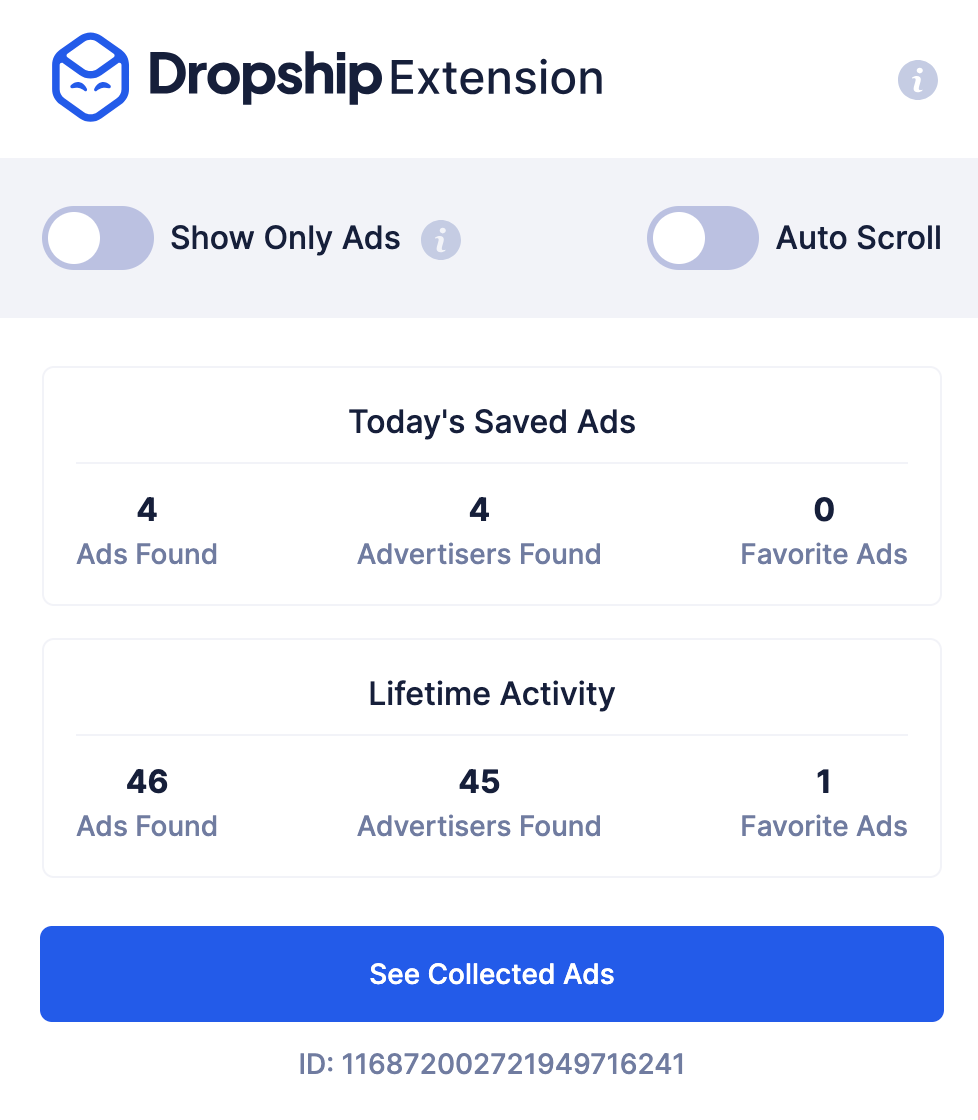
The extension reduces screenshot and filing work. Open the collected view after each research session and add a reason-for-saving note. A one-click collection can become clutter faster because saving has almost no friction.
Keep detailed notes in a separate sheet when the collected view lacks fields your team needs. The ad remains the source, while the sheet records the decision. This also gives you a portable index because the public listing doesn't describe an export function.
Use the extension for a weekly competitor review or a session with many candidates. Choose the manual route when extensions are restricted or you research from mobile.
How to use saved Facebook ads
This four-step saved-ad testing process turns each useful ad into a controlled creative test. Run the steps in order:
- Decode the candidate elements: Name the hook, offer, proof, and visual choice.
- Check audience engagement: Read comments for intent, objections, and confusion.
- Build an original version: Recreate the useful structure for your product and audience.
- A/B test the version: Change one major variable and compare the result.
Use what you learn in each step to complete the next one.
1. Decode the candidate elements
Decode the ad by separating its hook, offer, proof, visual device, and call to action. Start with what a viewer can observe, then explain the job each element performs. This keeps your note tied to the creative instead of guessing about sales you can't see.
Use a short record for every decoded ad:
- Hook: What earns attention in the opening moment?
- Offer: What does the viewer get, and under which condition?
- Proof: What makes the claim believable?
- Visual: What can the viewer understand before reading closely?
- Test idea: Which single element would you rebuild first?
I write the test idea last because it forces the earlier notes to produce a decision. "Show the waterproof claim with a continuous pour test" can guide a brief. "Good video" can't tell a creator what to film.
Add a confidence label after the test idea. Use observed when the feature is visible in the creative, inferred when you're explaining a likely purpose, and unknown when the ad lacks enough context. The label tells the next person which notes are observations and which are interpretations.
Keep the distinction between an element and its surface treatment. A rapid before-and-after reveal is a reusable structure. The competitor's footage, product shots, voice-over, and copy belong to that brand. Understand the job, then create new assets that do it for your buyer.
2. Check audience engagement
Use comments and reactions to find buyer language, objections, requests, and points of confusion. Engagement can't prove profitable sales, but it shows how people understood the message and which questions the creative left unanswered.
Read the thread with four labels in mind:
- Intent: People ask where, when, or how to buy.
- Objection: People resist the price, claim, size, or delivery terms.
- Request: People ask for another color, use case, or product version.
- Confusion: People misunderstand the offer, product, or demonstrated result.
The useful note preserves the wording people use. If several comments ask whether a case fits one phone model, that phrase belongs in the next brief. A large reaction count without that context gives you less to act on.
Separate comments about the product from comments about the ad. Praise for an edit shows that it caught attention. Questions about fit, material, or shipping identify information to verify in the product or offer. Spam, giveaways, and unrelated tags add volume without a usable signal.
Check whether the advertiser replies and what it explains. Repeated answers can reveal missing information in the ad. They can also show which objection the brand handles after the click instead of inside the creative.
Compare question types and repeated objections across the advertiser's other active ads. Audience size, ad age, placement, and paid distribution change raw totals, so a smaller thread with purchase questions may reveal more than a larger thread full of tags and jokes.
3. Build an original version
Adapt the mechanism by rebuilding it with your own product evidence, buyer language, footage, and offer. Write a one-sentence creative hypothesis before anyone opens an editing tool. That sentence should name the audience, the element you borrowed, and the response you expect.
A useful hypothesis shows a specific product benefit in the first scene. The target buyer can then understand the payoff before the offer appears. The resulting ad still needs original copy, visuals, and proof your product can support.
The original angle must match evidence your product has. A workshop tour needs a real process to show. Support every award, ingredient, and allergy claim with your own product records.
Build an evidence inventory before writing the new script. List the demonstrations you can film, specifications you can prove, customer feedback in your records, and terms you can honor. Then match the saved structure to that inventory. The order keeps the idea tied to facts your store can defend.
Translate the buyer language into your own voice after the proof is settled. Keep the plain words customers use, but remove phrases that belong to the competitor's identity or promise.
This is where a swipe file earns its keep. Several ads may reveal the same job through different executions. That range gives you room to design a fresh version. One isolated ad can tempt you to imitate its surface because you haven't seen the broader pattern.
4. A/B test the adapted version
A/B test one meaningful creative change against a clear control and judge it with the metric tied to your campaign goal. Keep the audience, offer, landing page, and budget treatment stable enough that the creative difference remains interpretable.
Choose one variable from the decoded note. Test the opening shot, hook line, proof device, or call to action. Changing all four may produce a winner, but it won't explain which decision caused the difference.
Check the control before reading the result. Both versions need the same tracking event, landing-page state, offer terms, and delivery period. A stockout or broken page can make sound creative look weak, while a temporary discount can make the new version look stronger than it is.
Record the control and variant in the same test log. Include the asset name, launch time, audience, spend rule, and stopping condition. The log preserves the original question when the campaign changes later.
Before launch, set a loss limit from contribution profit. Our Facebook ad testing budget guide explains the calculation.
Set the decision rule in advance. Match the metric to the campaign goal, use the evaluation window from your established account baseline, and name the result that justifies another test or a stop. A modest first test can answer one question. A larger launch may mix unproven ideas and leave the result hard to explain.
Use saved ads to shortlist products
Use saved ads to create a product shortlist, then validate demand, economics, and fulfillment outside the ad itself. The ad supplies evidence about positioning and visible audience response. Verify profit, return risk, supplier reliability, and customer acquisition cost through separate product research.
Group saved ads around the same product type or buyer problem. Common hooks reveal the benefit advertisers put first. Comment objections can expose sizing confusion, slow delivery, weak proof, or a missing variation.
Look for the same product in creative recorded on separate capture dates. Repeated testing makes the product worth checking more closely than one isolated post with a large reaction count.
Comments add the buyer's words to the shortlist. Save phrases that describe the desired outcome, hesitation, and current alternative. They can shape a product-page checklist even when the product fails your sourcing or margin review.
Because public engagement doesn't reveal profit, my next move would be to verify the selling price, landed cost, delivery time, return risk, and active competition. Those checks come before samples or traffic.
The shortlist is ready when each candidate has a product angle, visible buyer response, and separate validation path. A high reaction count alone keeps the product in research. Rank the finalists by evidence quality before you compare potential upside.
Facebook ad examples worth studying
Rad Power Bikes and Partake Foods show how to record a useful idea and create a new execution. Each lesson fits a different kind of product.
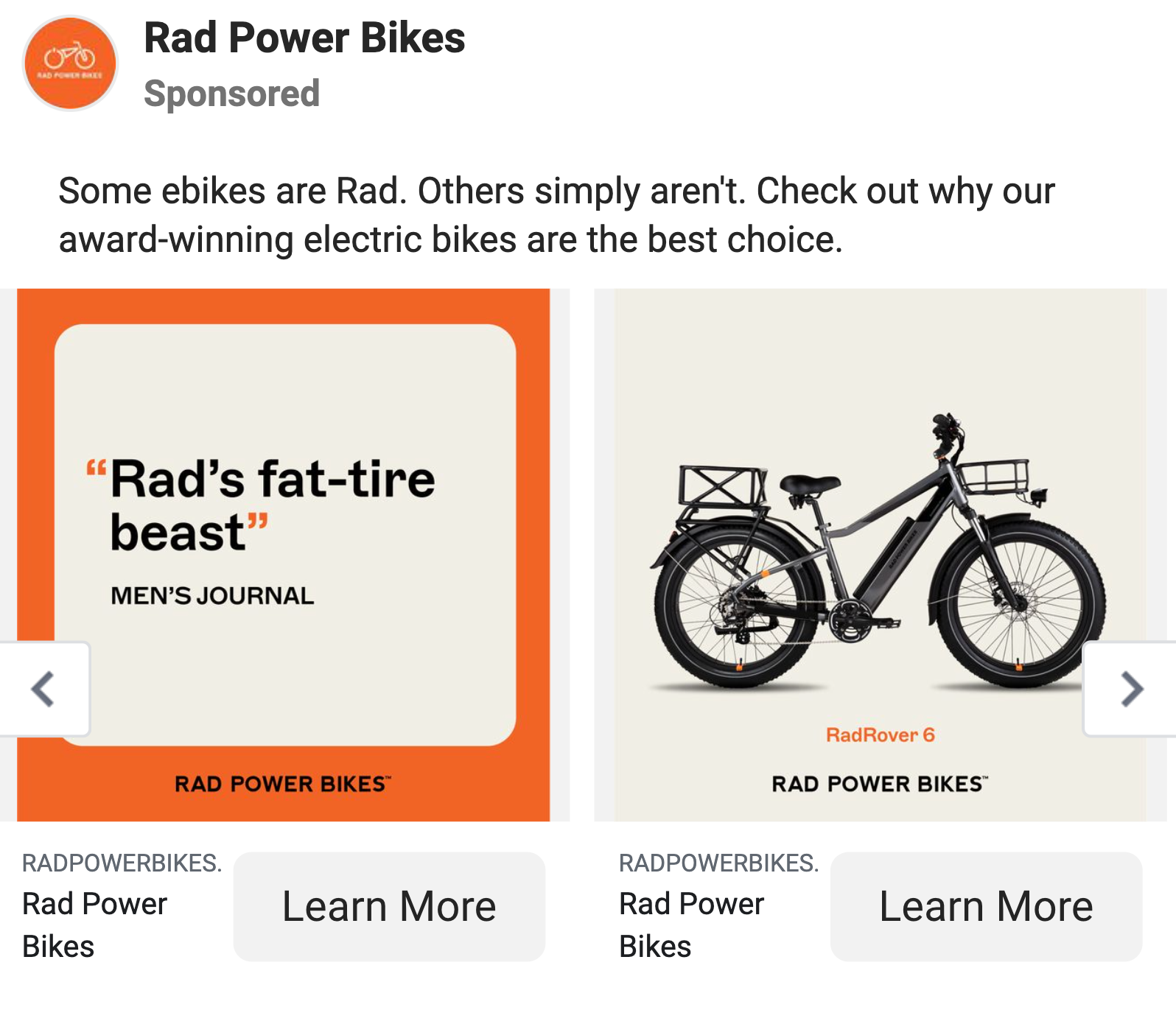
Current Rad Power Bikes creative uses concrete product benefits and offer framing. The approach makes a practical benefit visible before the click.
Save the benefit, proof device, and audience context separately. Offer-heavy creative makes it harder to separate the discount's effect from the product benefit, so test those ideas independently.
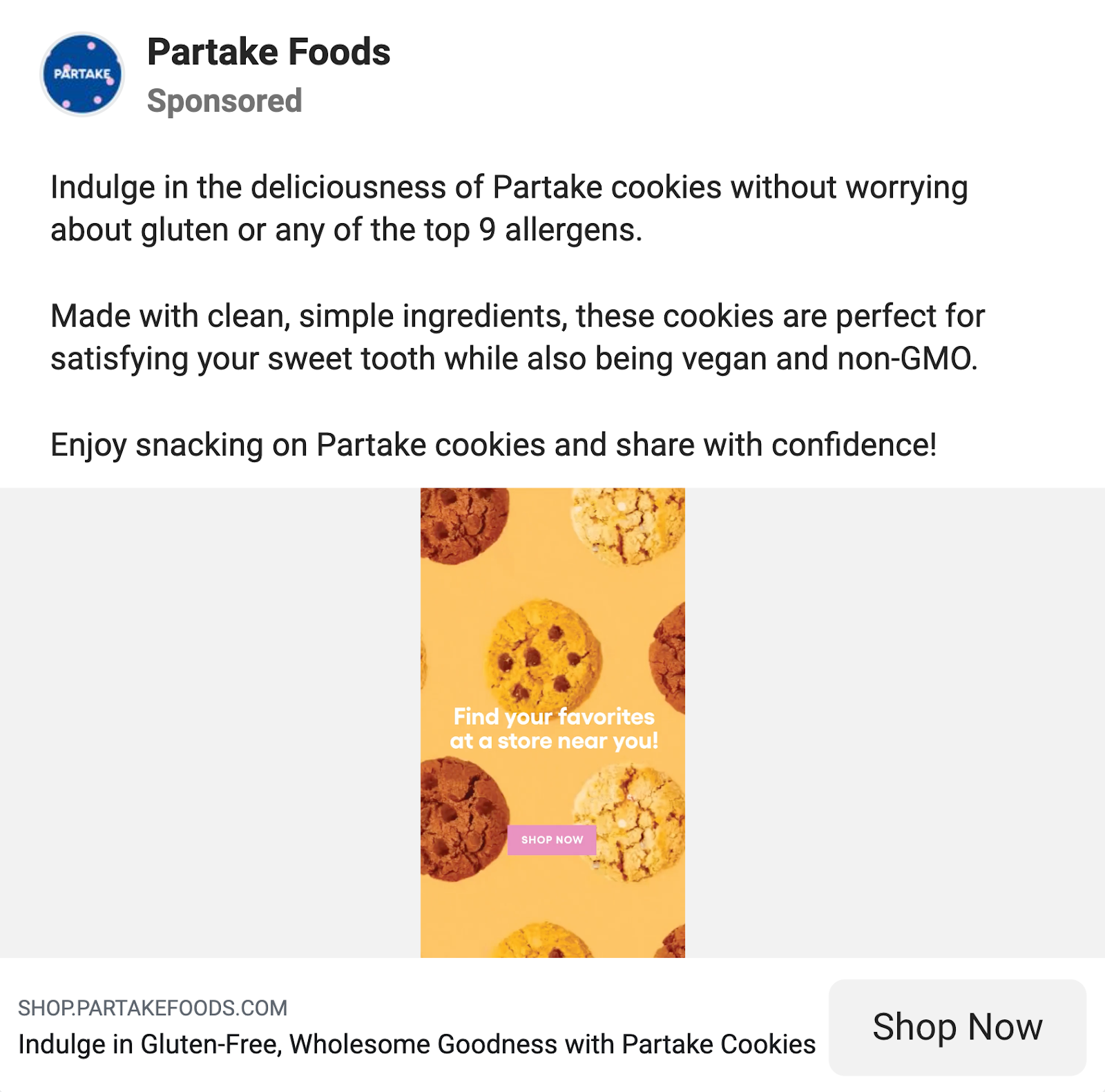
Current Partake Foods creative leads with a problem and inclusion promise. Its snacks give people with common food allergies something they can share. The product facts support that message.
An original version would start with the buyer's restriction, then show the fact that answers it. This approach depends on verified product claims and won't transfer to a general snack without that constraint.
Rad starts with visible performance, while Partake starts with a buyer constraint. Save either pattern only when your product has matching proof. Otherwise, the structure may look polished while leaving the core claim unsupported.
FAQ
Is it okay to reuse a competitor's ad creative?
Study the structure, then create new copy, footage, images, and proof for your own product. An original execution gives the idea a reason to fit your buyer and offer.
How many ads should I save to spot a pattern?
No fixed number of saved ads proves a pattern. Use 10 as an organizing target for a first batch, compare the element across advertisers, then run a controlled test to learn whether it fits your product.
Can the Dropship extension save ads elsewhere?
The public extension listing documents Facebook-ad and Shopify-store research. Use a separate platform-specific workflow for TikTok or Instagram unless the extension interface explicitly adds that capability.


